
Your workspace / Your framework

An agent
workspace you
can build on.

Your AI companion for real work. Choose its models, shape its behavior in mono-agent.config.json, and embed it in your own TypeScript application.

Local-first. Open source. Yours to extend.

01 / YOUR WORK, YOUR WAYOpen the blueprint
Work in it. Build on it.
  • An embeddable AI companion
  • Your models, cloud or local
  • Your behavior, one blueprint
  • Tools that do real work

One JSON file.
Your agent’s blueprint.

From your folder to your workspace
  1. Your folder

    Role, files & knowledge

  2. One blueprint

    mono-agent.config.json

  3. Your workspace

    Organize. Delegate. Inspect.

Models: cloud or localExtend with channels · memory · skills · MCP
mono-agent.config.json Example
{
  "runtime": {
    "model": "openai-codex:gpt-5.6-terra",
    "workspace": "."
  },
  "context": {
    "identityPath": "./IDENTITY.md",
    "skillsRoot": "./skills",
    "selectedSkills": ["code-review"]
  },
  "memory": {
    "mode": "lite",
    "writeMode": "append-host-summary"
  },
  "tools": {
    "allowedTools": ["Read", "Grep", "WebSearch"],
    "mcpConfigPath": "./mcp.json"
  },
  "telegram": {
    "enabled": true,
    "allowedChatIds": ["YOUR_CHAT_ID"]
  }
}

Version the blueprint. Identity, skills, MCP definitions, secrets, and live state stay separate.

Choose your
building blocks.

Start with a model and a point of view. Add only what your work needs.

One agent. Many possibilities.
  1. Foundation

    Set the role, model routes, and reusable instructions that shape each turn.

  2. Context & connections

    Give your agent the tools and memory the work needs. Leave the rest out.

  3. Delegated work

    Hand focused work to subagents and bounded background jobs.

  4. Continuity

    Schedule recurring work and inspect retained results—not just recollections.

Projects, tags, and persistent subagents are available in v0.22.0 .
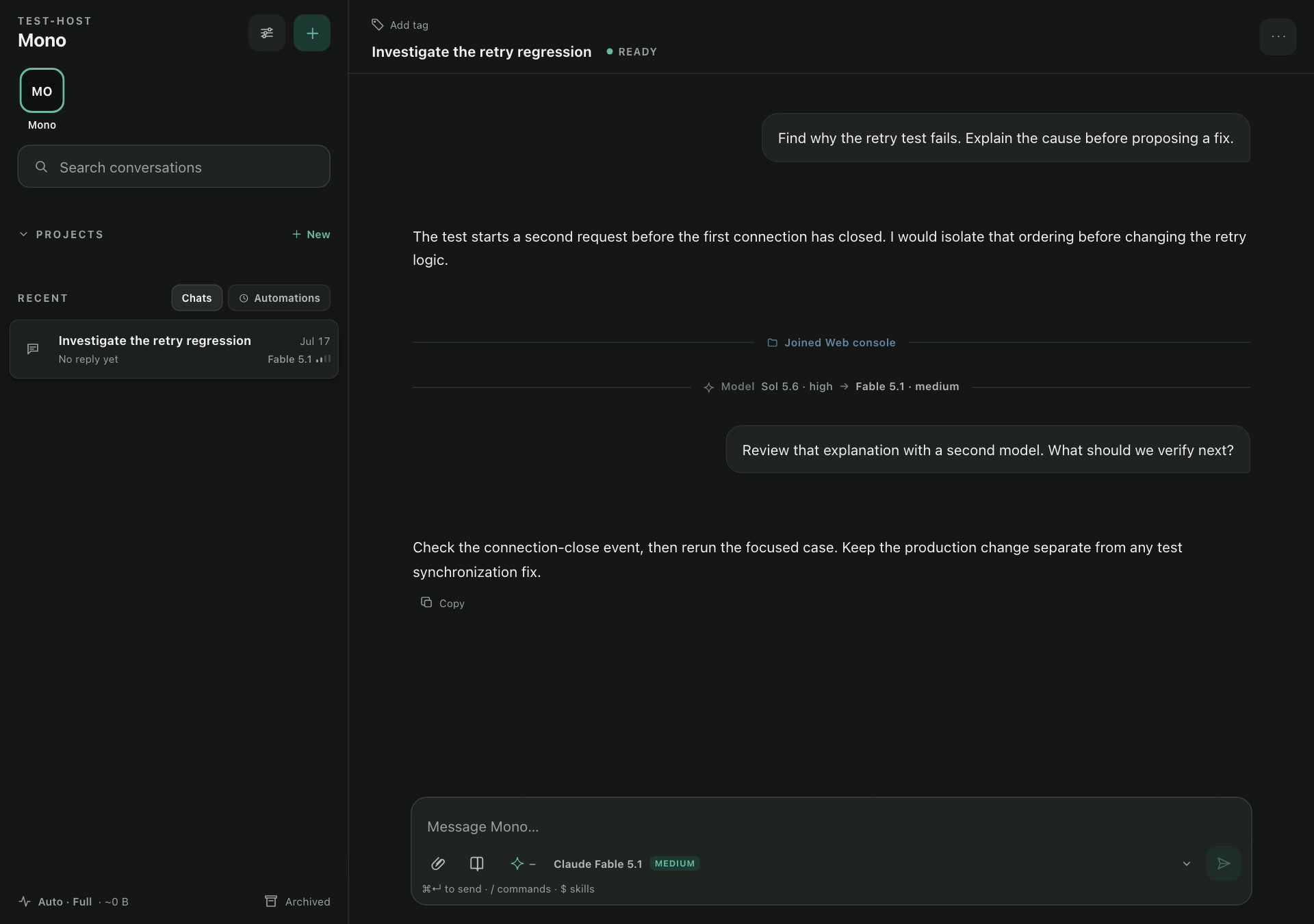
Less re-briefing.
More progress.

Desktop Mono Agent console showing a conversation, sidebar, model-change marker, and message composer.
Actual desktop console · synthetic example data and connection state · current source build. Tap for details · Open full resolution · Release notes
01 / MAKE IT YOURS

Your companion. Your way of working.

Give it a role, your files, and selected tools. Add skills and memory when the work needs them—not another custom host.

Shape your agent
02 / DELEGATE

Choose the model. Keep the work.

Switch supported models for the next reply. Delegate a focused task to a persistent subagent, then follow up without rebuilding its brief.

Models & subagents
03 / INSPECT

Check what ran. Then carry on.

After an interruption, inspect retained tool results—not just remembered facts—before deciding what to do next.

Execution evidence

Work in it.
Build on it.

Use the workspace today. Embed its configured responder in your TypeScript application.

Mono Agent Workspace to TypeScript composition
Run the full host, embed a transport-free responder, or compose a lower-level harness.
const responder = await
  createConfiguredAgentResponder({ config });

TypeScript excerpt · config loaded from your blueprint. Imports & full example

Hermes Agent Learning-oriented personal agent
Built around reusable, evolving skills, with memory, messaging, and delegation. Integrate through its protocols or embed AIAgent in Python.
OpenClaw Gateway-centered agent platform
Connects agents, messaging, and a browser control UI. Its documented embedding path supervises the executable through the Gateway WebSocket protocol.
Coding harnesses Codex · Claude Code · OpenCode
Codex CLI Terminal coding & automation
Inspect, edit, run, and review a repository. Use skills and MCP, or script repeatable work with codex exec.
Claude Code Coding across terminal, IDE & web
Extend coding workflows with project instructions, skills, hooks, and MCP. Build custom agents with the Agent SDK.
OpenCode Provider-flexible coding
Choose model providers and move between Plan and Build modes in an open-source terminal, desktop, or IDE workflow.

Models, memory, tools, and delegation overlap. These are documented approaches, not a feature or performance ranking. Sources checked 20 September 2026.

A workspace you can extend—not a zero-setup hosted assistant.

Make a folder an agent

Setup is not instant: real model checks take several minutes and count as provider usage.

  1. Install the CLI

    Requires Node.js 24.15.0 or newer. No pnpm needed.

    npm i -g create-mono-agent

  2. Create the agent folder

    Bare init on a terminal is the guided wizard: it names the agent, writes its role, and proves each model route. Any flag scaffolds the files only.

    mkdir my-agent
    cd my-agent
    mono-agent init
  3. Open the workspace

    Validate and start the agent, then run the browser console in its own terminal and open the URL it prints.

    mono-agent validate
    mono-agent start
    mono-agent web run --loopback

Short answers, honestly

Is everything really in one JSON file?
The blueprint brings runtime, context references, memory, tools, and channels together. Identity, skills, MCP definitions, secrets, provider auth, and framework-managed state stay in their own files or stores. You still need the referenced files, provider auth, and any channel or memory services the blueprint selects. Run mono-agent validate to check the shape, finish any reported setup, and restart after edits.
What does “local-first” actually mean here?
Your agent files and run artifacts are stored on your machine by default. The models, tools, and channels you configure may send the context they need to their own services, so read what each one transmits before you enable it. Preferring a model on your own hardware keeps even inference local.
What can I inspect after a run?
RunHistory reads settled run evidence; SessionHistory reads separately retained tool invocations and results, including failures and interruptions. Curated memory is a different source. Retention is bounded and records can be incomplete: inspection helps you decide what to do next, but does not automatically resume work or prove that repeating a command is safe. Read the evidence boundaries.
Which models can I use?
Supported <provider>:<model> routes include subscription and API providers such as OpenAI Codex and Anthropic, plus fully local providers like Ollama or LM Studio. Ordered fallbacks can try another route, and results and traces report when the selected route changes.
Is the web console safe to expose?
Treat it as single-owner with no application login: anyone who can reach it can operate your agents. Keep it on loopback unless you have a reason not to, and read the console security docs first.
What does it cost?
mono-agent itself is free, open-source software under GPL-3.0. Cloud usage follows your provider’s subscription or API pricing, including setup calls. Local models use your own hardware.
Where is the full documentation?
The complete guides, configuration reference, and security model live on the documentation site — start there when the config file gets ambitious.